Features

What Levart does, screen by screen

Levart is software for travel agencies that run cars for corporate clients and walk-in customers. It covers the whole month: taking bookings, getting duty slips and logsheets back from drivers, raising GST invoices, paying suppliers and staff, and seeing what you made. Every screenshot below is the real product.

Trips & duty slips

Fixed trips, on-call bookings and the apps your drivers fill in.

On-call trips

Book it, send the duty slip, and the trip prices itself when the driver closes it.

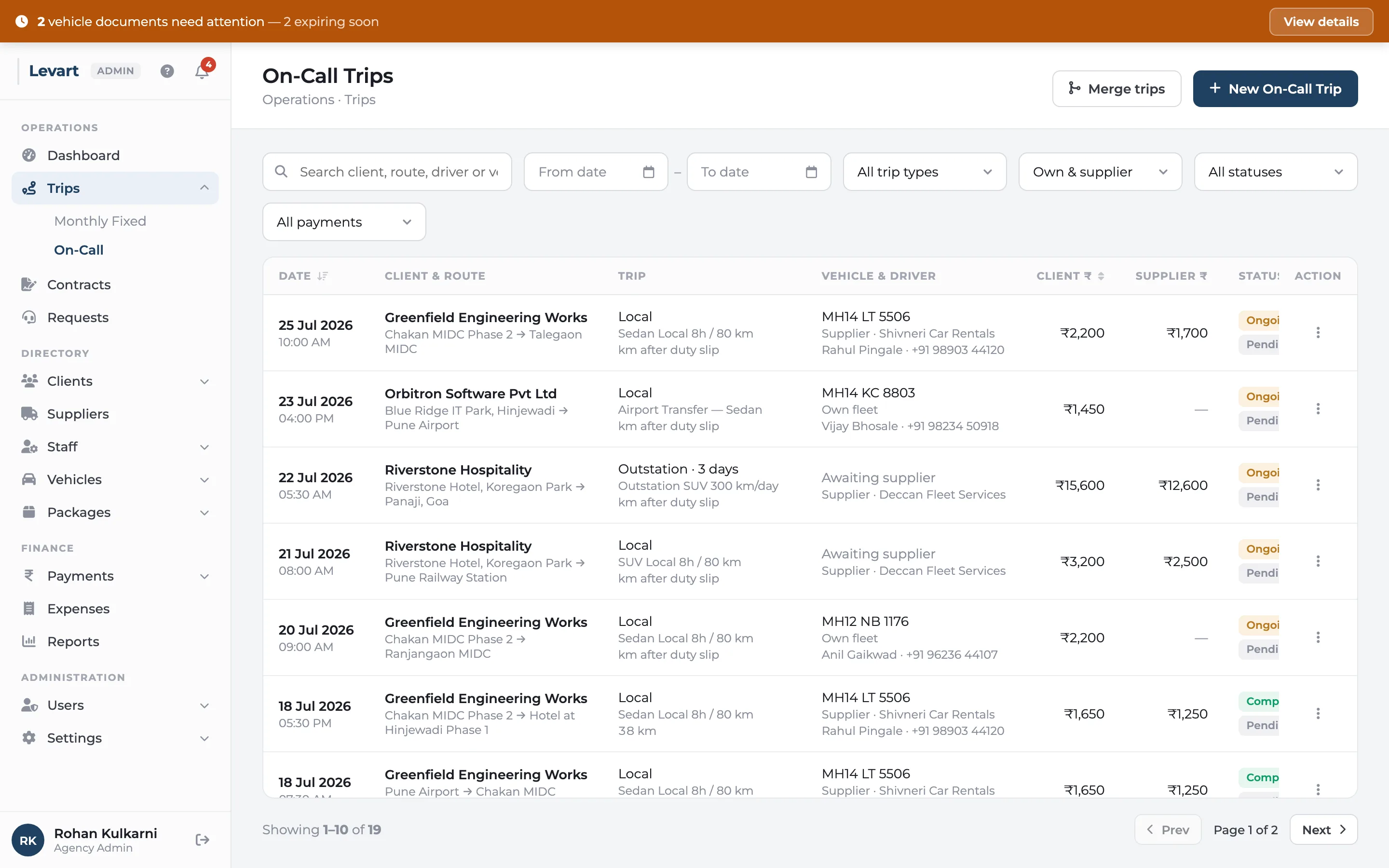
In Levart, an on-call trip is a one-off booking: an airport drop, a day in the city, a three-day outstation run. You enter the client, route, pick-up time and package, choose your own car or a supplier's, and Levart creates a duty slip link for the driver. When the driver closes the trip, the bill is worked out from the package — base fare, extra kilometres, extra hours, tolls and night halts.

More about on-call trips
Levart on-call trips list with pick-up date and time, client and route, vehicle and driver, client amount, supplier amount and payment status for each trip

Digital duty slip

A link, not an app. Odometer photos and the customer's signature, straight from the driver's phone.

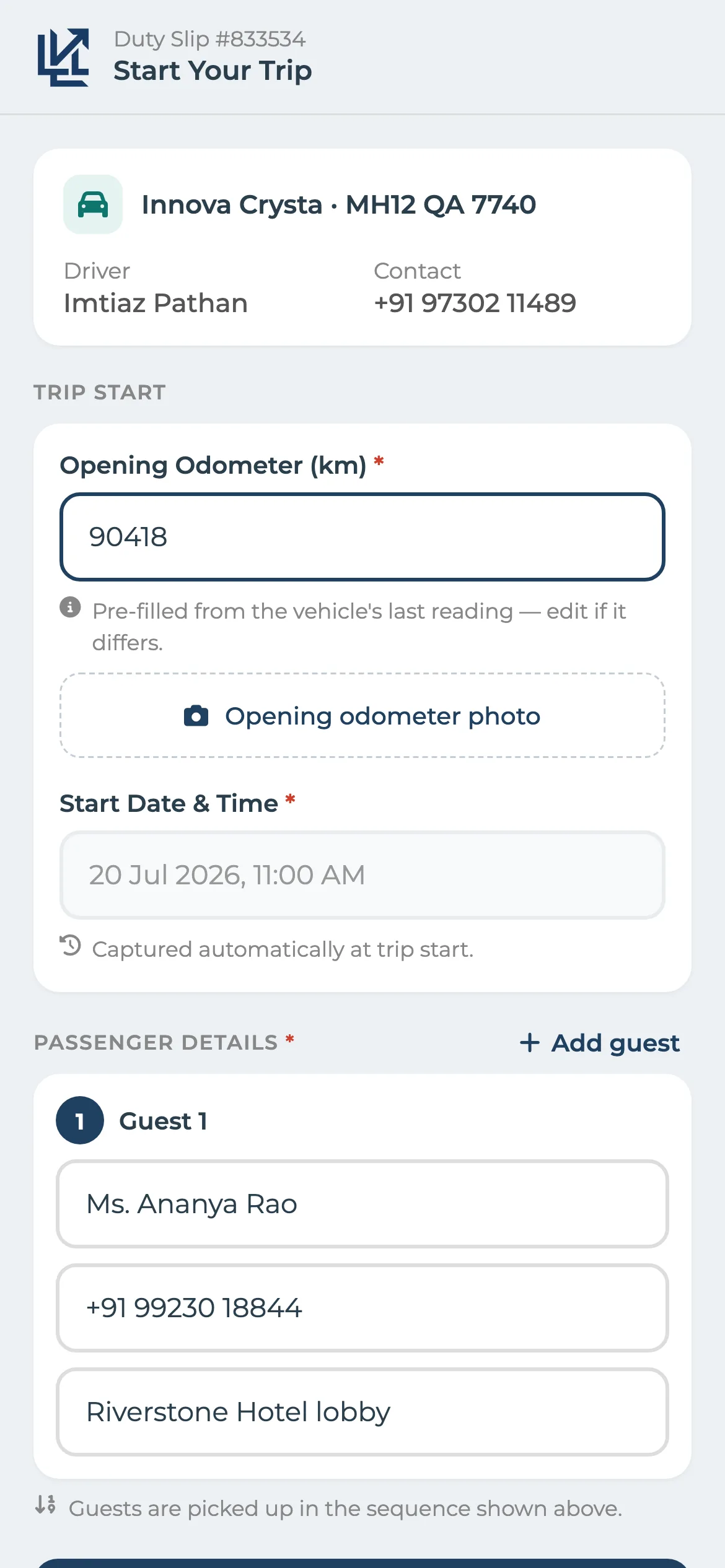
A duty slip is the record of a single trip: the vehicle, the driver, the opening and closing kilometres, times and the customer's signature. In Levart every on-call trip gets a duty slip link. You send it on WhatsApp, the driver opens it on any phone — nothing to install — and records the readings with photos. When they finish, the trip is closed and priced in your office.

More about digital duty slip
Levart digital duty slip on a phone at the start of a trip, with the opening odometer reading and a photo of the odometer

Driver logsheet app

No more chasing paper logsheets on the 1st. Every trip is in the office the day it's driven.

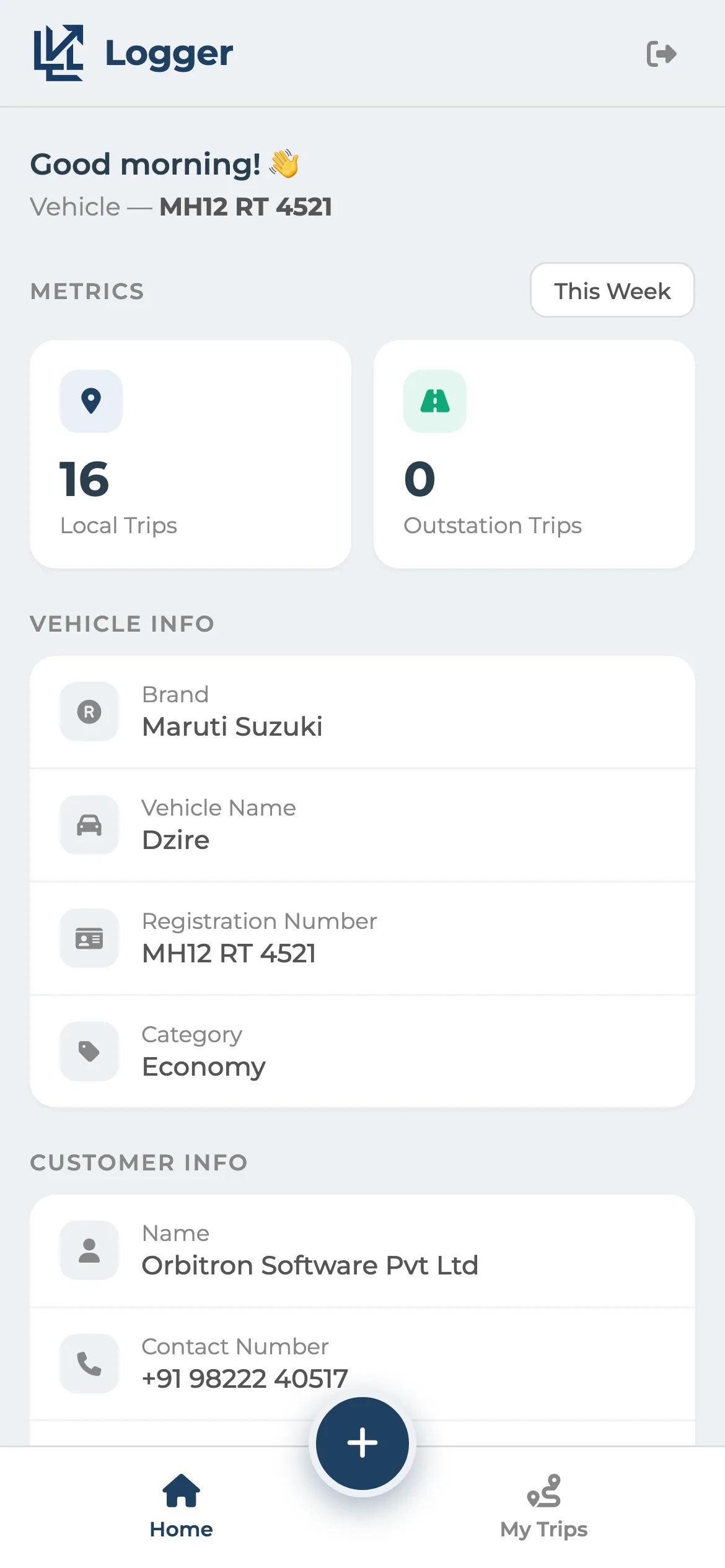
The logsheet is the driver's day-by-day record of trips on a monthly contract car. Levart's logger app puts it on the driver's phone. The driver signs in with the vehicle number and the contract's four-digit code, taps Start when the trip begins, records the kilometres with an odometer photo, and taps Complete at the end. Each trip is in your office straight away, ready for the month's invoice.

More about driver logsheet app
Levart driver logsheet app home screen showing the vehicle, today's trips and the start trip button
Contracts & invoicing

Contract rules in, GST invoices out.

Monthly fixed contracts

Write the contract rules down once. Every month's invoice follows them.

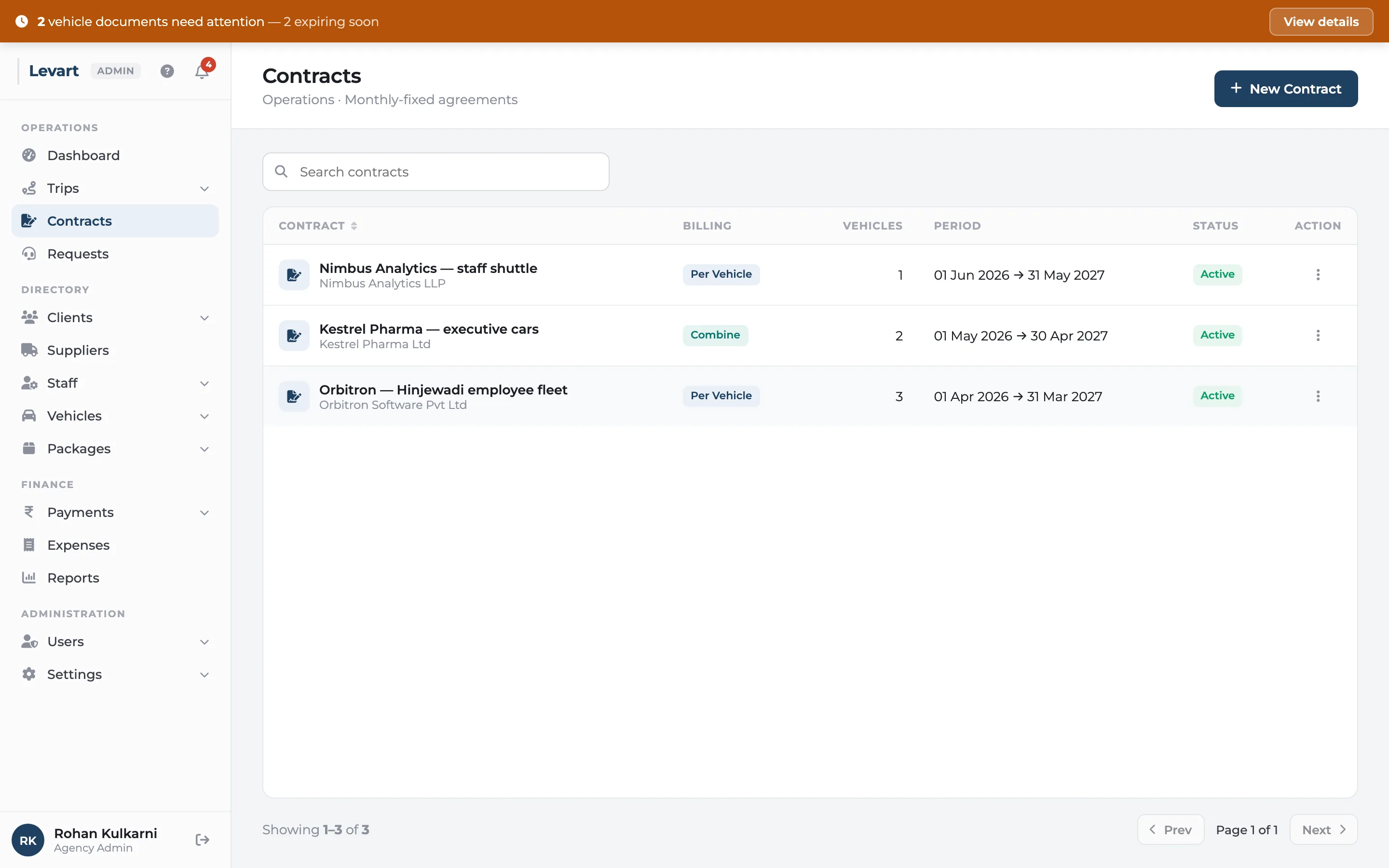
A fixed-vehicle contract is a corporate client hiring cars for the month at an agreed rate, with a kilometre and hour limit and charges for going over. In Levart you set the contract up once — which vehicles, on which package, how the extras are billed, GST, TDS, payment terms — and every trip logged against it is billed by those rules when you raise the month's invoice.

More about monthly fixed contracts
Levart contracts list showing each monthly contract with client, billing mode, vehicles and status

GST invoicing

CGST, SGST or IGST worked out for you, printed on your letterhead or your pre-printed paper.

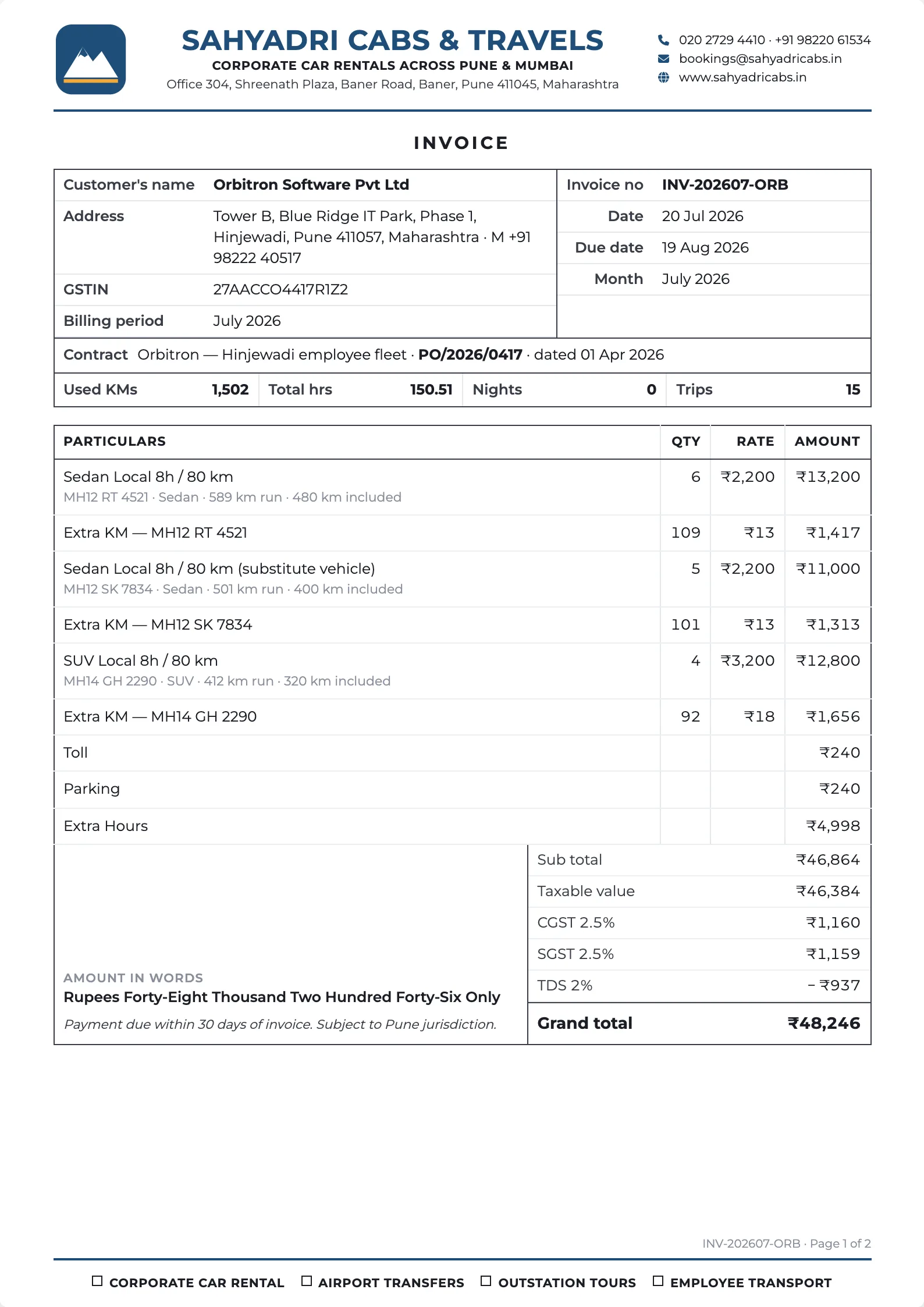
Levart raises the GST invoice from the month's trips, so nobody retypes kilometres into a billing program. It decides CGST plus SGST or IGST by comparing the client's state with yours, handles reverse charge and TDS, rounds the total and writes the amount in words. You print it on a letterhead Levart builds from your profile, or on your own pre-printed letterhead paper.

More about gst invoicing
A Levart GST invoice on the agency's letterhead with customer details, vehicle usage, line items, CGST and SGST, amount in words and bank details
Payments & expenses

What suppliers and staff are owed, and where the money went.

Supplier & staff payments

Supplier statements that match theirs, salaries with advances recovered, expenses booked to the car.

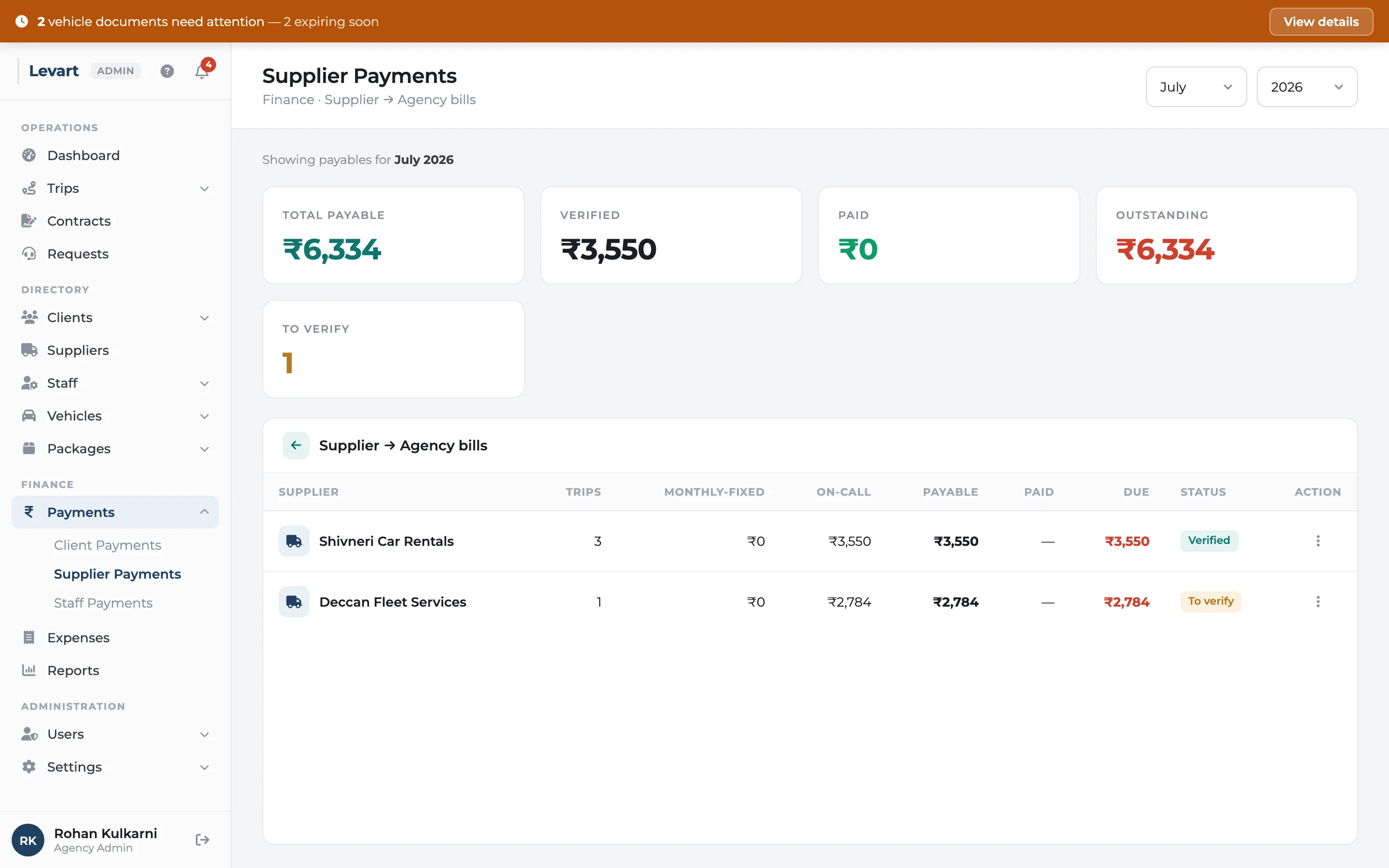
Levart works out each supplier's bill for the month from the trips their vehicles ran for you: on-call trips at the supplier's package rate, substitute vehicles they provided, and contract cars they own. Tolls, parking and driver allowances are added where you agreed to pay them back. For your own staff it tracks salaries, allowances and advances, and you can log expenses like fuel and maintenance against each vehicle.

More about supplier & staff payments
Levart supplier payments for the month showing each supplier's trips, amount owed, paid and balance
Fleet & records

Vehicles, documents, drivers, suppliers, clients and rate cards.

Fleet & documents

Every vehicle, driver and supplier in one register, with document expiry warnings.

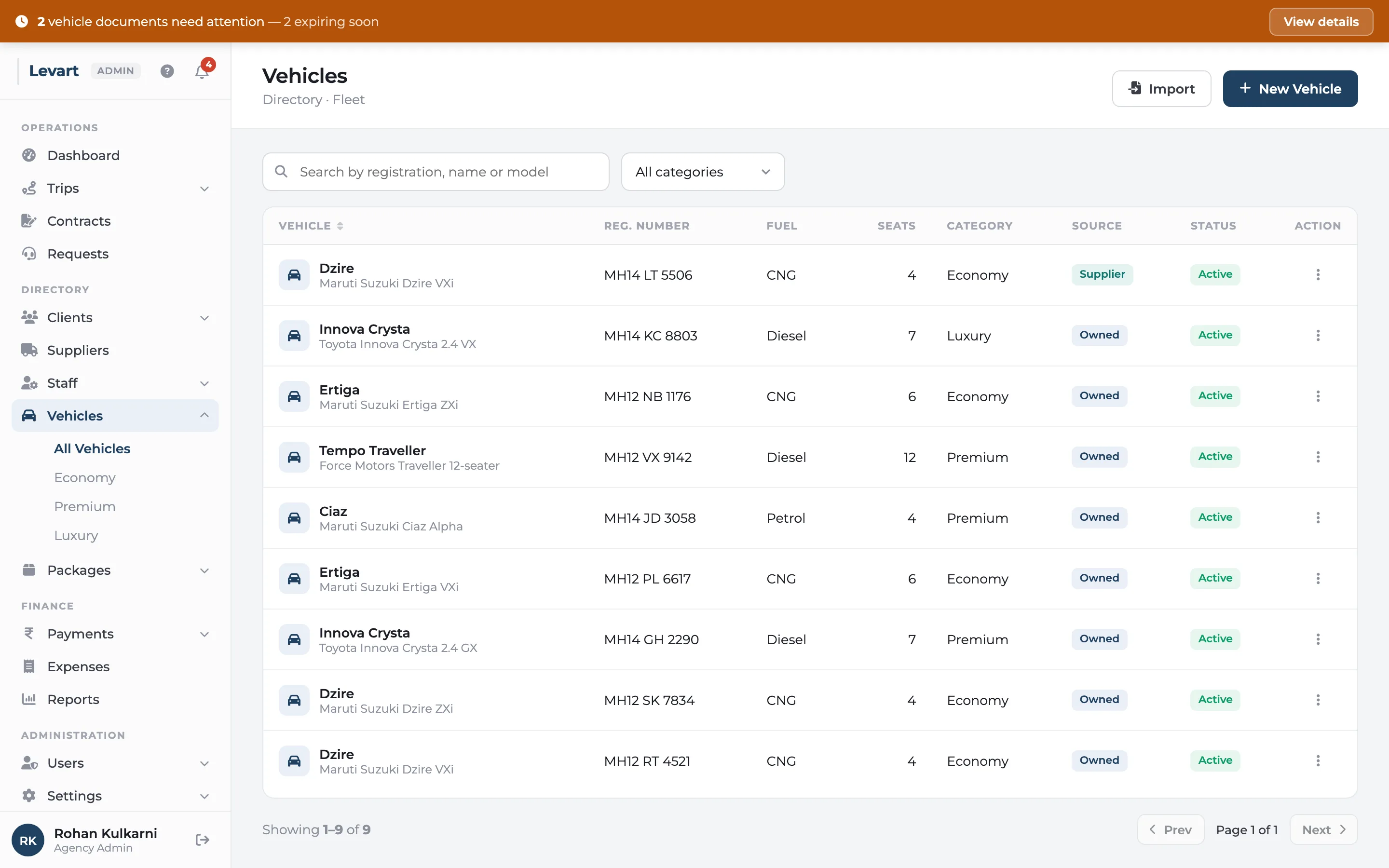
Levart keeps the records an agency runs on: vehicles (your own and suppliers'), drivers and office staff, suppliers and clients. Each vehicle can carry its documents — insurance, permit, fitness certificate, PUC — with expiry dates, and Levart warns you across the top of every screen when one is about to lapse.

More about fleet & documents
Levart vehicles list with registration number, type, category, owner and status

Packages & rate cards

8 hours / 80 km, airport flat fares, monthly packages: define them once, use them everywhere.

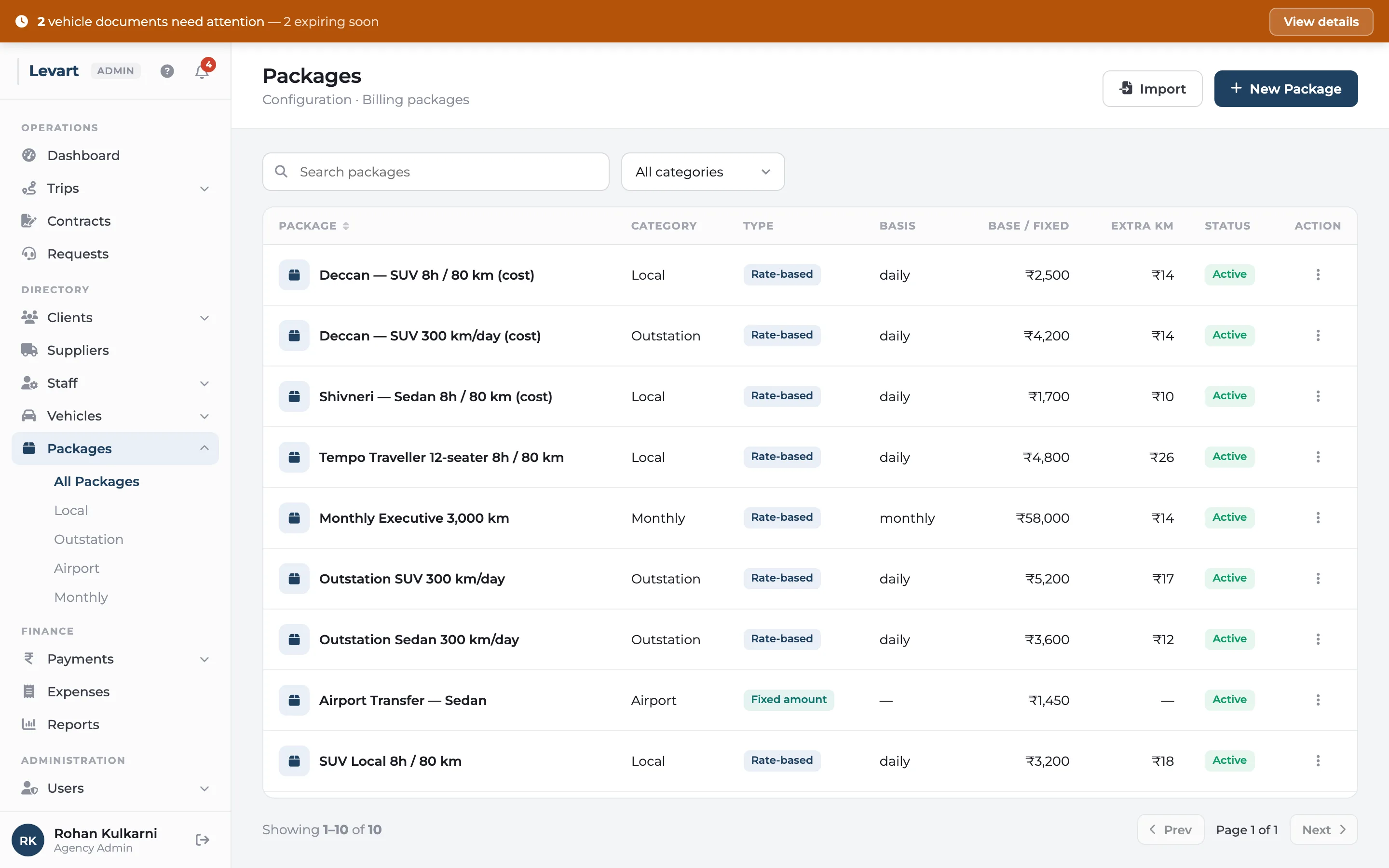
A package is a rate card: what you charge for a trip or a month, the kilometres and hours that includes, and the rate for each extra kilometre and hour. In Levart every trip and contract is priced from a package. Packages can be daily, monthly or a fixed amount, and can be kept for one client or used for what a supplier charges you.

More about packages & rate cards
Levart packages list with base rate, included kilometres and hours, and extra kilometre and hour rates
Reports

Turnover, GST, outstanding and profit, by month or year.

Reports & GST

Profit by month, money owed by age, and the GST numbers your accountant asks for.

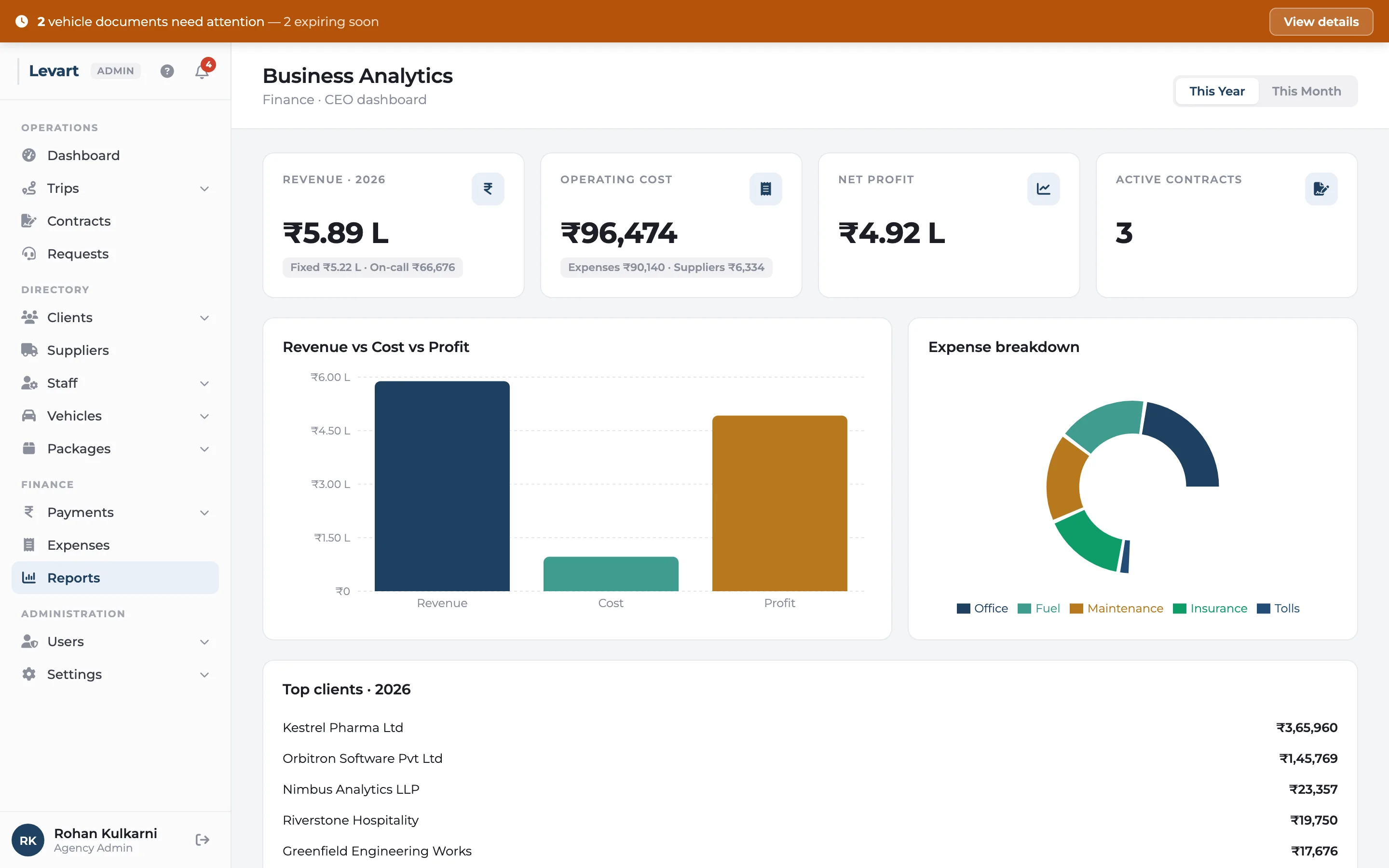
Levart's reports answer the questions an agency owner and their accountant ask every month: how much did we bill and spend, which clients owe us and for how long, and what GST did we charge. Every report reads from the same invoices and trips, so the dashboard, the outstanding list and the GST report always agree.

More about reports & gst
Levart business analytics with revenue, operating cost, net profit and active contracts for the year
Your team & clients

Logins for your staff, a portal for your clients, help when you need it.

Client portal

Clients check their usage and invoices themselves, and send requests without a phone call.

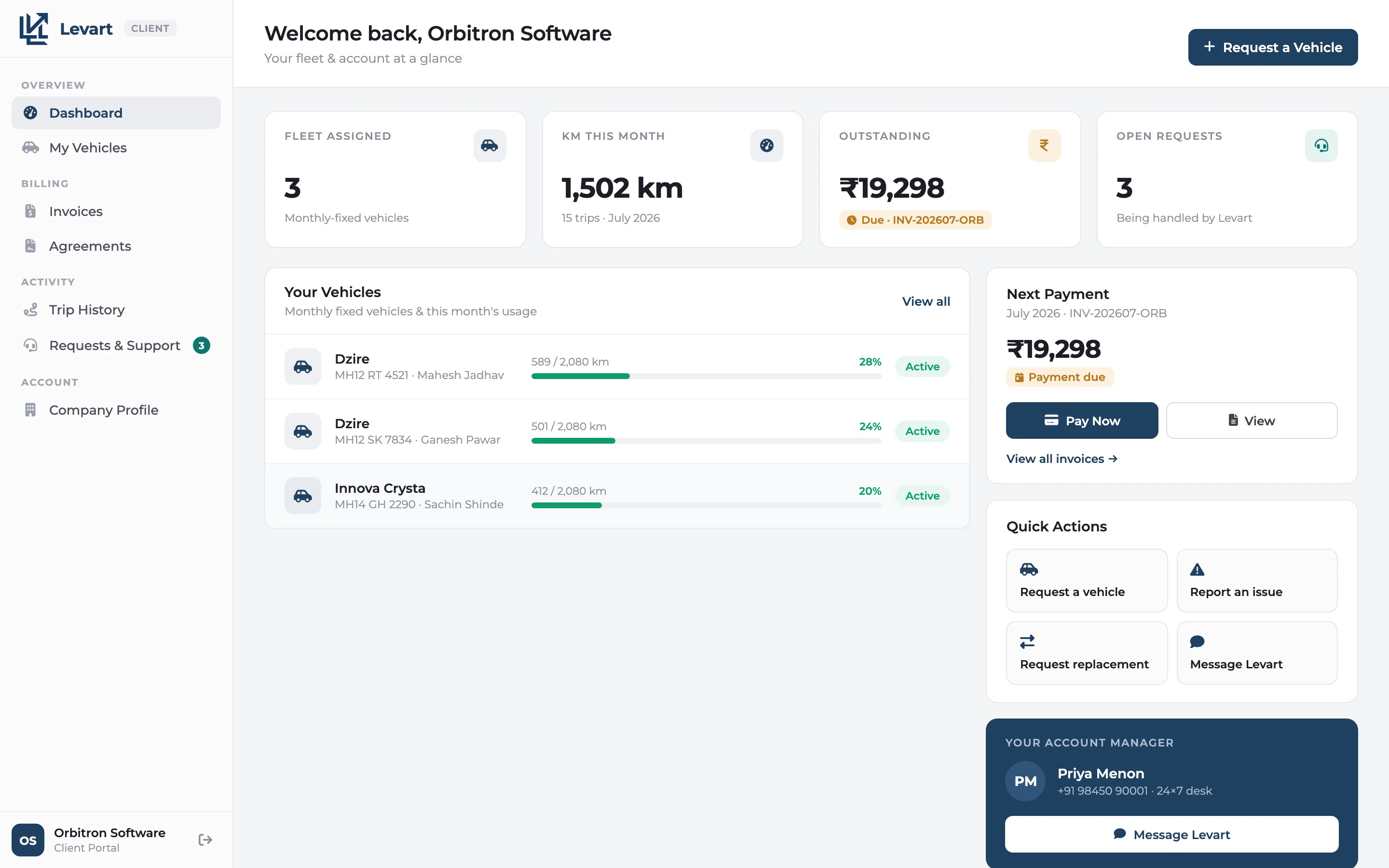
The client portal is a login for your corporate clients. They see their assigned vehicles with KM used against the limit, every trip, their invoices and agreements, and can send you requests for a vehicle, a replacement or an issue. They never see your suppliers.

More about client portal
Levart client portal dashboard showing the client's fleet, kilometres this month and outstanding invoices

Team & permissions

Operations books trips, accounts sees payments, and nobody sees what they shouldn't.

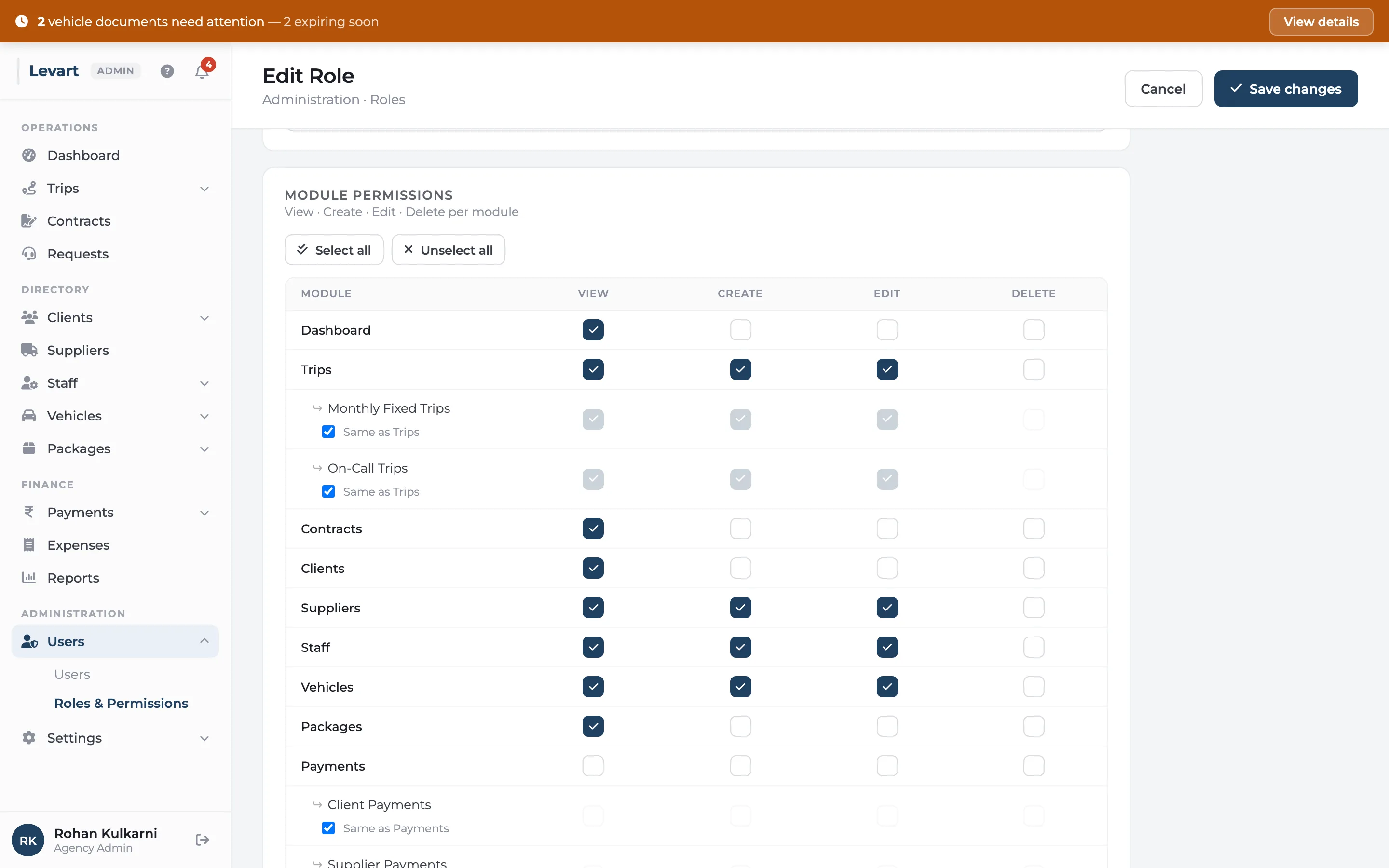
Every person in your agency gets their own Levart login. Access comes from their role, and you decide for each part of the console — trips, contracts, client payments, supplier payments, reports, settings — whether a role can view it, add to it, edit it or delete from it.

More about team & permissions
Levart role editor with a permission matrix of view, create, edit and delete for each module

Works on your phone

Check a trip, raise an invoice or answer a client from the road.

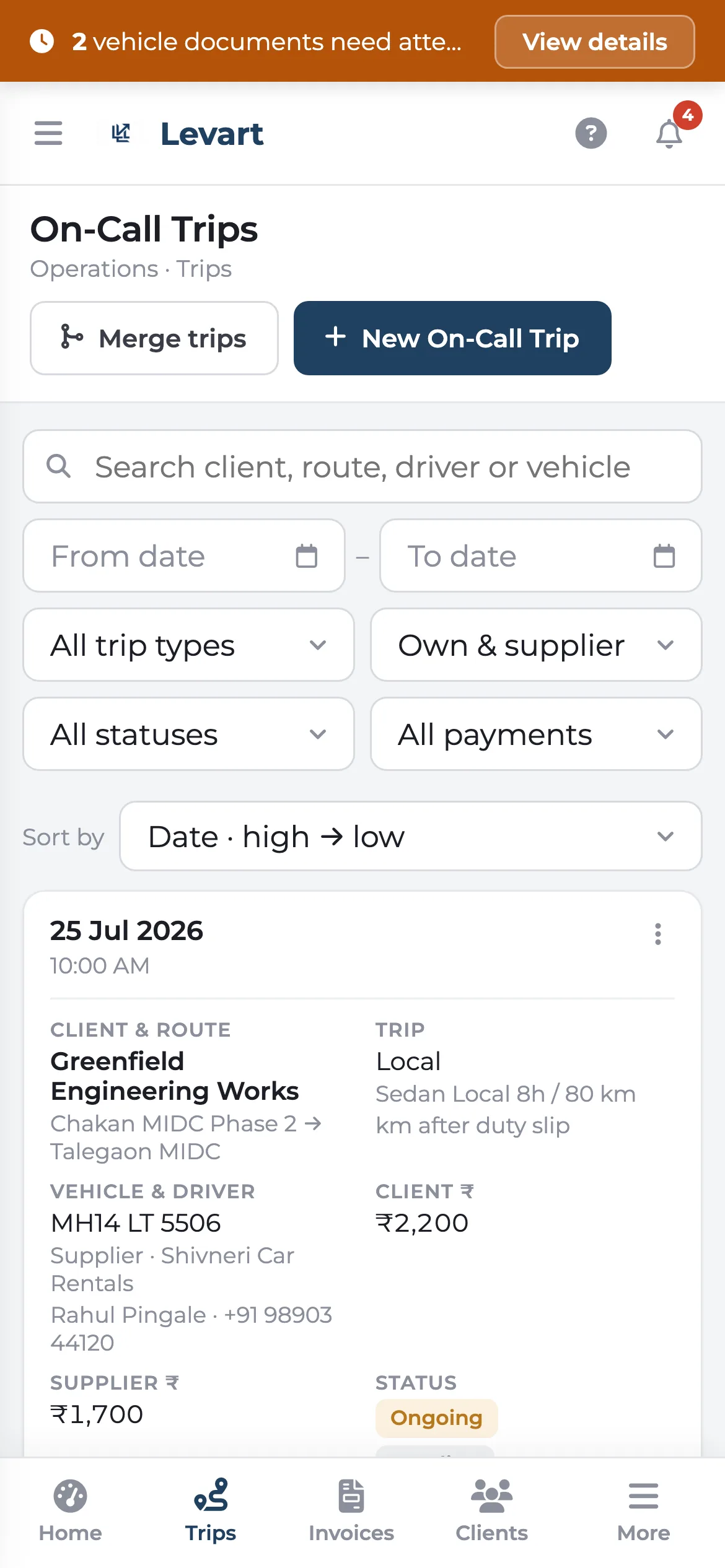
The whole Levart console works on a phone. It switches to a phone layout with tabs along the bottom, lists shown as cards you can tap, and the save button always on screen. Add it to your home screen and it opens full screen with its own icon, like an installed app. Drivers use the duty slip and logsheet apps on their own phones.

More about works on your phone
Levart on a phone showing on-call trips as cards with bottom navigation tabs

Guided setup & help

A checklist, a tour, and screens that tell you what to add first.

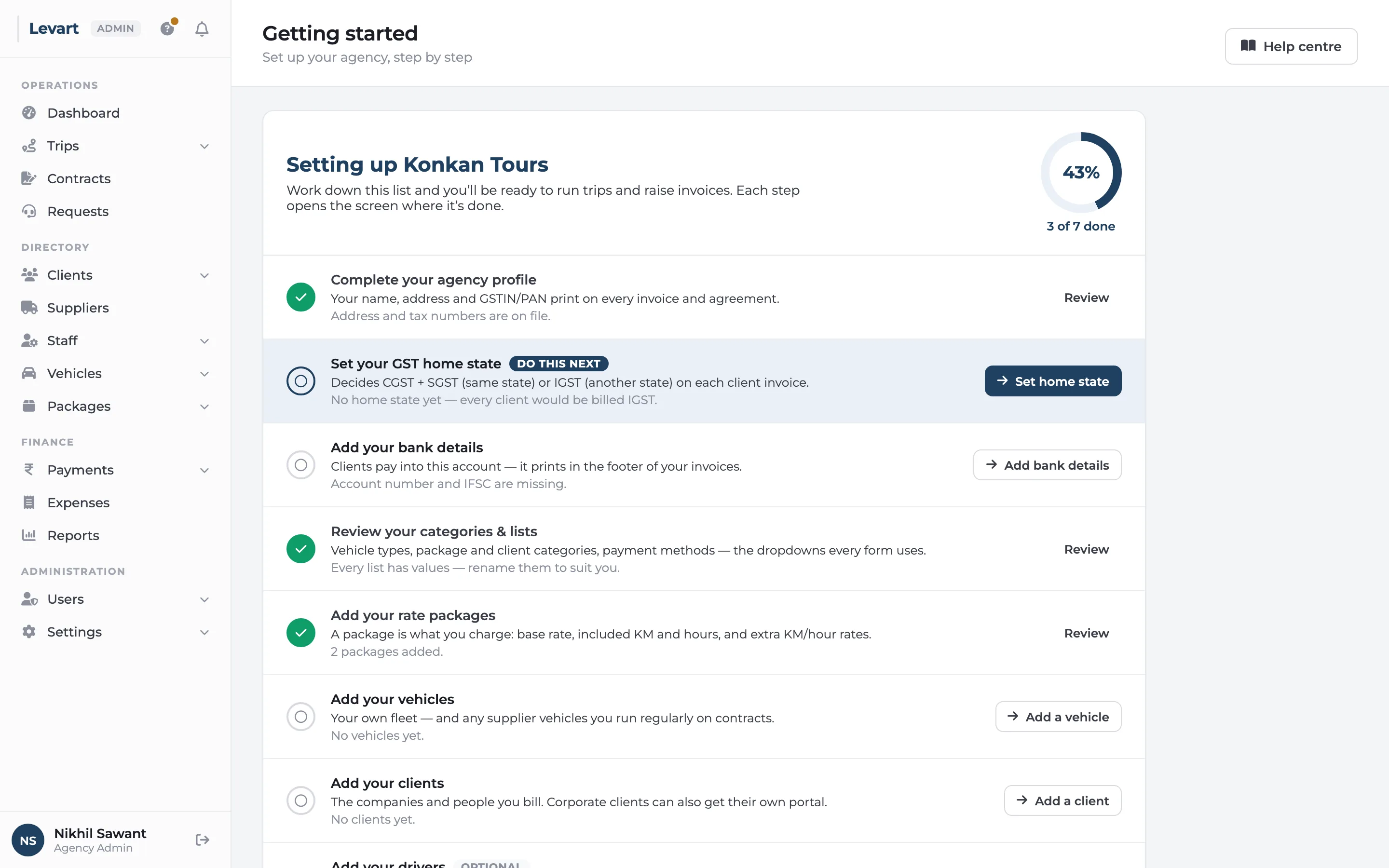
When your agency is set up in Levart, the dashboard shows a checklist of what to do before your first trip: complete your profile, set your GST home state, add bank details, rate packages, vehicles and clients. Each step opens the screen where it's done. Screens that depend on something else say so, so you never stare at an empty form wondering what's missing.

More about guided setup & help
Levart getting started checklist with completed and remaining setup steps and the next step highlighted
The smaller things

The details that eat your evenings

None of these sell software on their own. All of them come up every month.

Substitute vehicles

Attach a stand-in car to a contract trip when the regular one is in the garage. A different supplier's car is paid at its own rate.

Merge supplier trips

Price a supplier's short same-day runs as one trip, so you pay for a day's work, not three minimum fares.

Bulk add a month's logsheet

Pick a vehicle and month and type or paste every trip into one grid.

Fortnightly or start-date billing

Bill a contract by calendar month, from its start date, or every fifteen days.

Carry unused kilometres forward

On pooled contracts, a quiet month's spare kilometres offset a busy month, within limits you set.

Sunday and holiday rates

Hours on Sundays and the contract's holidays billed at their own hourly rate.

Advances and late fees

An advance is adjusted against invoices until it runs out; overdue balances can carry a pro-rata late fee.

Credit notes

Reduce what a client owes after the invoice is out, with the GST reversed on the credit.

Fuel at actuals

Where the contract says fuel is extra, the fuel you log against the car goes on the client's bill.

Email invoices

Send the invoice to the client's email from Levart, with a link to see it in their portal.

Excel import

Bring clients, suppliers, staff, vehicles and packages over from a spreadsheet.

Live notifications

Hear about it when a driver starts or finishes a trip, or a client sends a request.

Made for Indian agencies

Built from real duty slips, logsheets and GST invoices

The way Levart bills came from working agency paperwork, not a template: 8-hour/80 km packages, night halts, driver allowance, tolls and parking at actuals, monthly contracts with department-wise invoices, and on-call trips that corporate clients want on one bill at month-end.

  • Everything in rupees, with Indian number formatting
  • CGST + SGST or IGST from the client's state, reverse charge and TDS
  • Your SAC code, PAN and GSTIN on every invoice
  • Dates as 07 Jul 2026 and times with AM/PM
  • Fixed monthly contracts and on-call trips side by side

Want to see it with your own trips?

A 30-minute call. Bring last month's duty slips or one of your contracts.